Introduction
Most development teams already understand the value of GitHub. It provides a central repository, commit history, comparison tools and a familiar way to preserve changes over time.
The challenge with Qlik Sense is not GitHub itself. The challenge is getting meaningful application content into GitHub in the first place.
A Qlik Sense application is not stored as a normal collection of text files. That means a useful GitHub workflow needs to expose the application's internal metadata in a form Git can actually read and compare.
Where GitHub Fits in a Qlik Sense Workflow
GitHub is very good at preserving readable source files and showing how they change from one commit to the next. That makes it a natural place to keep a technical history of a Qlik application.
Used well, GitHub can provide:
- A permanent history of application metadata.
- Commit SHAs that identify exact review points.
- Side-by-side comparison between earlier and later versions.
- A repository that sits outside the live Qlik application.
- A familiar source-control record for development teams.
The important part is ensuring the repository contains useful application content, rather than simply storing another copy of the Qlik application file.
The Qlik Sense Binary File Challenge
A Qlik Sense application is stored as a binary file. GitHub can store that file, but it cannot look inside it and explain what changed.
It cannot tell you that a load-script section was updated, a master measure changed, a variable was removed or an expression inside a chart object was altered.
This is the key difference between Qlik and a conventional software project. In a normal codebase, Git can compare the source directly. With Qlik, the useful source information is held inside the application and must first be extracted.
Putting a Qlik application file into GitHub creates a file history. Exporting its internal metadata creates a change history.
Exporting Qlik Metadata Directly to Git
A more useful approach is to extract the internal metadata from the Qlik Sense application and commit that content as readable files.
Once exported, GitHub can do what it does best: preserve each version and show meaningful differences between commits.
This avoids forcing developers to redesign the application purely for source control. The application can continue to be developed normally in Qlik while the repository receives a structured snapshot of the content that matters.
For a wider discussion of this approach, see our Qlik Sense Version Control guide.
What Qlik Sense Metadata Should Be Exported?
A useful repository should capture enough of the application to explain both how data is prepared and how calculations are presented to users.
- Load script — the complete application script used to load and transform data.
- Master measures — reusable calculations and their expressions.
- Master dimensions — reusable dimensions and related definitions.
- Variables — application variables and their values or expressions.
- Chart-object metadata — full metadata for visual objects, including object-level measures, dimensions and expressions.
Together, these files provide a readable technical snapshot of the application at a particular point in the release cycle.
Keeping a Commit SHA History
Every Git commit has a unique SHA. That gives the release team an exact reference for the version of the Qlik metadata that was committed at a particular point in time.
Instead of relying on a vague statement such as “Git was updated”, the team can retain the exact commit SHA associated with the release.
That SHA can then be used to compare releases, confirm which version was reviewed and preserve a clear technical history of the application over time.
Making Git Activity Visible to Product Owners
Source control should not only be visible to developers. Product Owners and release stakeholders also benefit from knowing whether the technical snapshot for a release has actually been captured.
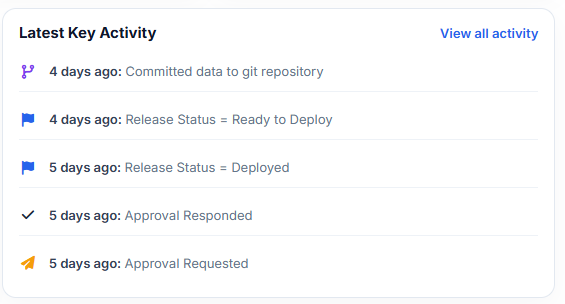
Within DevFulfilled, metadata export and Git commit activity is recorded as part of the release history. This means stakeholders can see that the repository was updated and when it happened without needing to ask the development team or inspect GitHub themselves.
The commit becomes part of the wider release record rather than a separate technical task hidden away from everyone else.
GitHub Is One Part of the Release Process
GitHub provides the technical history, but source control is only one part of delivering a Qlik Sense application safely.
For related areas, see:
- Qlik Sense Release Management — organising the complete journey from development through deployment.
- Qlik Sense Version Control — why Qlik requires a metadata-based approach to meaningful version history.
- Qlik Sense Change Management & Traceability — connecting technical changes to the reason they were made.
- AI Peer Review for Qlik Sense — reviewing exported metadata before the release progresses.
How DevFulfilled Helps
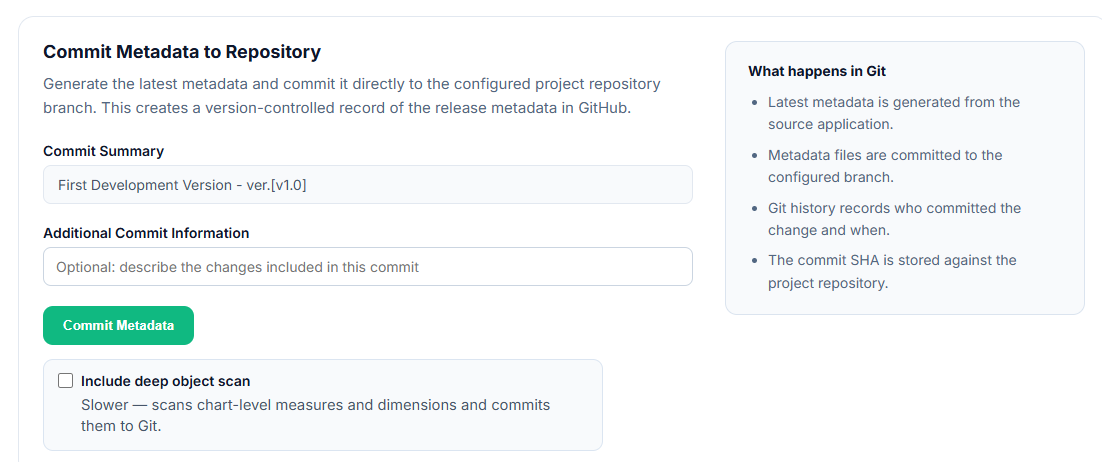
DevFulfilled connects Qlik Sense Cloud application metadata directly to GitHub as part of the release workflow.
From a release, the development team can export the application's internal metadata and commit the resulting files to the configured GitHub repository.
- Export load script, master measures, master dimensions and variables.
- Capture full metadata for chart objects, including object-level expressions.
- Commit readable files directly to the project's GitHub repository.
- Store the Git commit SHA against the release.
- Retain a history of previous release commits.
- Record export and commit activity in the release activity history.
- Give Product Owners and other stakeholders visibility that source control has been updated.
The result is a source-control process that remains useful to developers while also becoming part of a visible, governed release record.
Frequently Asked Questions
Can I store a Qlik Sense application in GitHub?
Yes, but storing the binary application file alone does not provide meaningful change comparison. Exported metadata gives GitHub readable content that can be compared between commits.
What Qlik Sense content can be committed to GitHub?
Useful exports include the load script, master measures, master dimensions, variables and metadata for chart objects, including object-level measures, dimensions and expressions.
Why store the Git commit SHA against a release?
The SHA identifies the exact repository state that belongs to that release. It provides a stable reference for comparison, review and historical traceability.
Do Product Owners need to use GitHub?
Not necessarily. DevFulfilled records metadata export and Git commit activity within the release history, allowing non-developers to see that source control has been updated and when.
Does GitHub replace release management?
No. GitHub provides source-control history. Release management also covers testing, approvals, deployment and the wider audit trail around how a Qlik application reaches production.